
Download Slemma – Powerful Data Analysis Tool for Small Business
Overview of Slemma
Slemma is a cloud‑based data analysis platform built with small businesses and start‑ups in mind. It automatically scans every piece of business data—sales figures, customer interactions, marketing metrics, and even inventory logs—to surface insights that tell you whether you’re on the right track. While the interface leans toward the modern, data‑driven professional, the learning curve can be a little steep for users who aren’t tech‑savvy.
The good news is that Slemma offers a free trial that lets you explore the dashboard, experiment with visualisations, and test its automated reporting features before committing to a paid plan. The tool’s core promise is to turn raw data into clear, actionable stories without requiring a team of data scientists. Whether you’re tracking monthly revenue, measuring campaign ROI, or simply trying to understand customer churn, Slemma provides a single pane of glass that consolidates data from dozens of sources—CRMs, e‑commerce platforms, spreadsheets, and even social media APIs.
Its visual analytics engine lets you build custom charts, heat maps, and trend lines in minutes, while its AI‑driven suggestions highlight anomalies and growth opportunities you might otherwise miss. In short, Slemma aims to democratise data insight for businesses that lack large analytics departments, offering a secure, scalable, and affordable alternative to enterprise‑grade BI suites.
Key Features & Benefits
- Unified Data Connector – Pull data from over 150 native integrations, including Shopify, HubSpot, QuickBooks, Google Analytics, and CSV uploads.
- AI‑Powered Insight Engine – Automated anomaly detection, trend forecasting, and recommendation suggestions based on historical patterns.
- Drag‑and‑Drop Dashboard Builder – No coding required; create interactive visualisations with a simple point‑and‑click interface.
- Real‑Time Collaboration – Share live dashboards with team members, set view‑only or edit permissions, and comment directly on charts.
- Scheduled Reporting – Automate PDF, Excel, or interactive web‑report delivery to stakeholders on daily, weekly, or monthly cycles.
- Data Security & Compliance – End‑to‑end encryption, GDPR‑ready architecture, and role‑based access controls keep your data safe.
- Mobile‑Responsive Interface – Access dashboards on iOS, Android, or any modern browser, ensuring you stay informed on the go.
- Custom Calculations & Metrics – Build derived metrics, weighted scores, and custom KPIs without leaving the platform.
Beyond the feature list, Slemma delivers tangible business benefits. By consolidating fragmented data sources, it eliminates the manual spreadsheet mash‑ups that often lead to errors. The AI‑driven insights cut down the time spent on exploratory analysis, allowing teams to focus on strategic decision‑making.
Collaboration tools ensure that every department—from marketing to finance—works from a single source of truth, reducing miscommunication and aligning goals. Moreover, the scheduled reporting function frees up valuable hours that would otherwise be spent on generating recurring performance updates. In practice, businesses that adopt Slemma report a 20‑30 % reduction in the time required to produce actionable reports and a measurable uplift in data‑driven decisions that directly impact revenue growth.
Installation, Usage & Compatibility
Getting Started – Simple Setup Process
Because Slemma is a SaaS solution, there’s no traditional “installation” on your local machine. You begin by visiting the official website, clicking the Start Free Trial button, and creating an account using your corporate email. After email verification, you are guided through an onboarding wizard that asks you to select the data sources you want to connect. The wizard supports OAuth authentication for popular services (e.g., Google, Microsoft, Shopify) and offers secure API key entry for custom integrations. Once connected, Slemma automatically pulls the latest data and creates a preliminary dashboard that highlights key metrics based on the selected sources.
Intuitive Usage Workflow
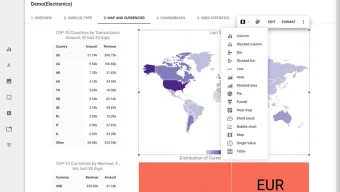
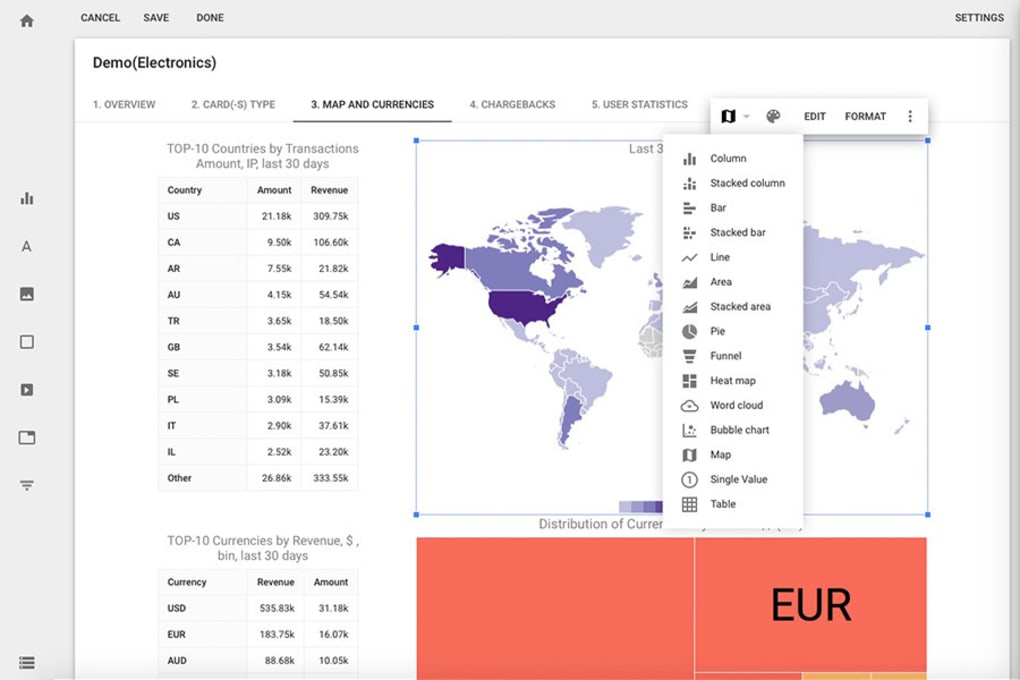
After the initial import, the platform’s left‑hand navigation panel presents four main modules: Data Sources, Dashboards, Insights, and Settings. In the Data Sources tab you can add, edit, or remove connections at any time. The Dashboards area is where you build visualisations; a library of chart types—bar, line, funnel, geographic map, and more—appears when you click the Create New button. Drag a data field onto the canvas, choose a visualization, and instantly see a preview. The Insights section surfaces AI‑generated recommendations, such as “Sales dropped 12 % YoY for product X; consider revisiting pricing.” Finally, Settings lets you configure user permissions, set up email report schedules, and manage subscription billing.
Cross‑Platform Compatibility
Slemma runs in any modern web browser (Chrome, Firefox, Edge, Safari) on Windows 10/11, macOS, and Linux desktops. Because the platform is fully responsive, the same dashboards render flawlessly on iOS and Android devices, making it ideal for executives who need real‑time access while traveling. The backend infrastructure is hosted on AWS, ensuring high availability, automatic scaling, and compliance with industry‑standard security protocols. For organizations with strict data residency requirements, Slemma also offers a private cloud deployment option on Azure or Google Cloud, though this is typically part of an enterprise‑level agreement.
Pros, Cons & Frequently Asked Questions
Pros
- All‑in‑one data connector eliminates the need for multiple ETL tools.
- AI‑driven insights provide actionable recommendations without manual analysis.
- Drag‑and‑drop dashboard builder is accessible to non‑technical users.
- Robust collaboration features keep teams aligned and reduce version control issues.
- Secure, GDPR‑compliant architecture protects sensitive business data.
- Free trial allows risk‑free evaluation before committing to a paid plan.
Cons
- Learning curve can be steep for users unfamiliar with data concepts.
- Advanced custom calculations may require a modest amount of scripting knowledge.
- Some niche integrations (e.g., legacy ERP systems) are not available out‑of‑the‑box.
- Real‑time data refresh intervals are limited to 15‑minute increments on the basic plan.
Frequently Asked Questions
Is there a free version of Slemma, or only a trial?
Slemma offers a 14‑day free trial with full feature access. After the trial, you can choose from tiered paid plans; there is no permanently free tier.
Can I import data from a local Excel file?
Yes. Slemma supports direct CSV and Excel uploads, which can be scheduled for periodic refresh or used as a one‑time data source.
How secure is my data on Slemma?
Data is encrypted both at rest and in transit using AES‑256 and TLS 1.3. Slemma complies with GDPR, SOC 2, and ISO 27001 standards.
What kind of customer support does Slemma provide?
All paid plans include email support, with the Premium plan offering 24/7 live chat and a dedicated account manager. The free trial users receive standard business‑hour email assistance.
Can I export my dashboards for offline presentations?
Yes. Dashboards can be exported as PDF, PNG, or interactive HTML files, and scheduled reports can be sent directly to email inboxes.
Overall Review: Slemma stands out as a powerful, user‑friendly analytics solution for small businesses that need more insight than spreadsheets can provide. Its AI‑driven recommendations and extensive integration library make it a compelling alternative to expensive enterprise BI tools. While the learning curve may deter absolute beginners, the free trial and rich documentation help smooth the onboarding process. For startups looking to turn data into growth, Slemma is a smart, secure, and scalable investment.
Conclusion & Call to Action
In the rapidly evolving world of data‑driven decision making, Slemma offers a balanced blend of automation, visual storytelling, and collaboration that small businesses and startups can leverage without breaking the bank. Its cloud‑native architecture guarantees accessibility across devices, while built‑in security measures keep your most valuable information safe. If you’re searching for a tool that can unify disparate data sources, surface AI‑powered insights, and empower every team member to understand the numbers, Slemma is worth a closer look.
Ready to see how Slemma can transform your business intelligence? Start your free trial today and explore the full suite of features risk‑free. For any questions, our support team is just a click away, and you can always upgrade to a plan that scales with your growth.



.png)



